

By Team Cocoriko on Feb 4, 2026 3:42:52 PM
Your platform's home page is the gateway to presenting all your consultations, both those that are ongoing and those that have been completed. It's a great place for your community to come back and see what's happening or check out the results. When it comes to promoting a consultation, it's best to direct people straight to the consultation itself.
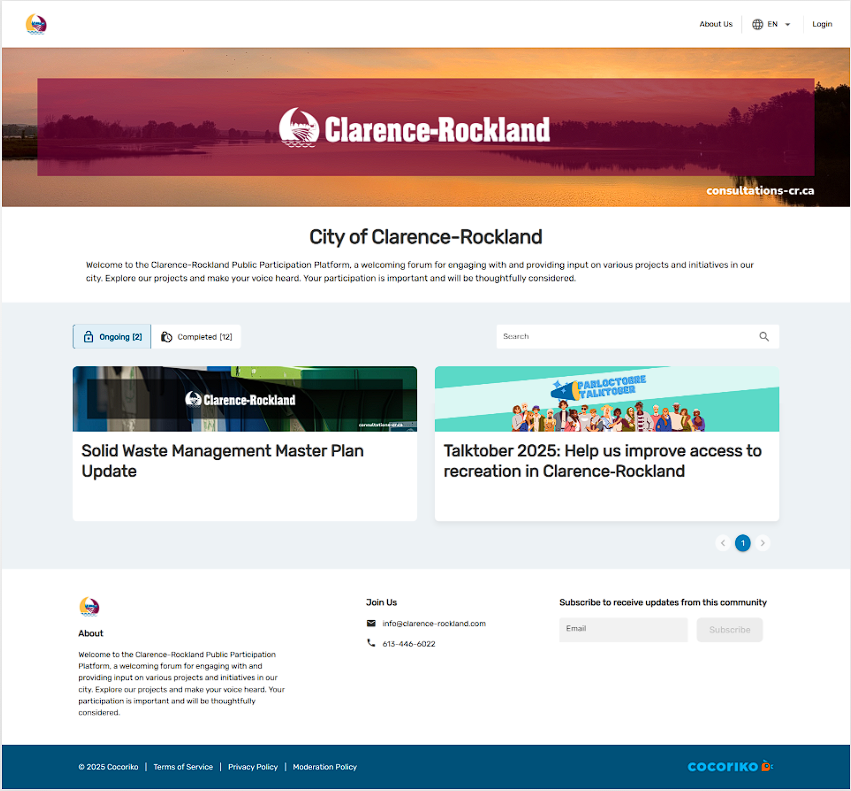
Presentation of elements from the top of the page:
- A banner displaying your brand image and allowing you to customize your platform.
- A title, which is often the name of your organization, but could also be a short, catchy text.
- A welcome message to greet your visitors to this interactive space.
- On the same line: current and completed projects, as well as the search area. The latter is especially useful for larger city websites that feature several consultations at the same time.
- Consultations or project pages, presented in two columns.
Consultations and projects are presented side by side, with no real distinction for your visitors since this information is not essential for them. Here is the difference in the participant's experience:
- For a consultation, participants will go directly to the questionnaire.
- For a project page, participants will arrive on a page presenting information: project context, consultation process, timeline, etc. An online consultation may or may not be available.
The home page displays up to 6 projects, with any additional projects appearing on page 2. This explains the numbering under the consultations.
The Join Us item in the footer is customizable, and we recommend that you include your organization's email address and phone number so that participants can reach you if they need more information.

Banner images
Banner images allow you to customize your platform, consulta …

Paper questionnaires and participation at a booth or by telephone
It is always preferable for people to participate themselves …

Add and manage the Q&A module
The Frequently Asked Questions (FAQ) module allows you to ad …